How I Reduced Codex Token Usage With Two Config Changes
Two Codex config.toml settings can delay automatic context compaction in long sessions. Here is the change, why it may reduce token usage, and what to verify before copying it.
On this page
Long Codex sessions can burn through tokens surprisingly quickly. The model is doing the real work, but once the conversation gets large, context management becomes part of the bill too.
The last post covered a ~/.codex/config.toml change for which model a subagent runs. This time I wanted to tune when Codex compacts a growing conversation.
lifcc (@mylifcc) shared a two-line change that they reported reduced token consumption during high-context Codex sessions:
找到一个降低5.6Sol token消费的办法: 在~/.codex/config.toml 中加入 model_context_window = 272000 model_auto_compact_token_limit = 240000 原理下面说:

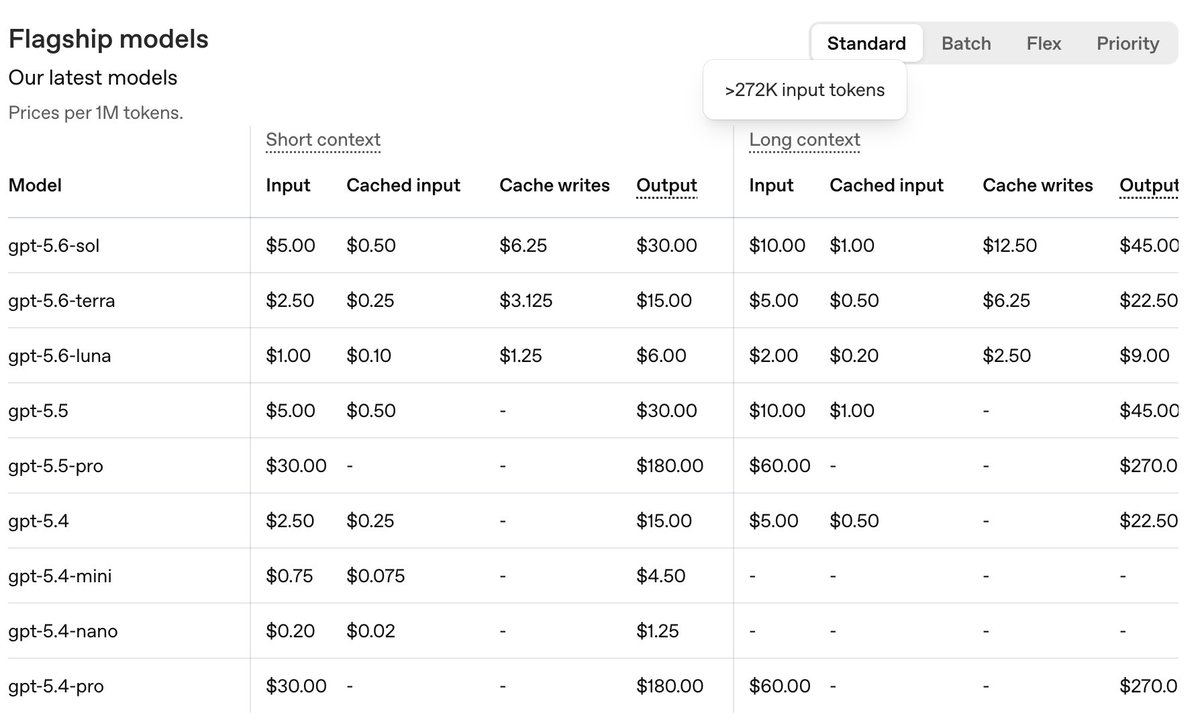
The two config changes
Add these settings to ~/.codex/config.toml:
model_context_window = 272000
model_auto_compact_token_limit = 240000
model_context_window tells Codex how much context is available to the active model. model_auto_compact_token_limit sets the threshold that triggers automatic history compaction.
In this example, compaction starts at 240k tokens, leaving about 32k of headroom below a 272k window. Both keys are documented in the Codex configuration reference.
Those numbers are an example from the original tip, not universal defaults. The right values depend on the active model, provider, and effective context limit. If you leave the auto-compaction limit unset, Codex uses its model default.
Why this may reduce token usage
Compaction replaces a large conversation history with a shorter representation so the session can continue within its context limit. Delaying that work can reduce how often it happens during a long task.
Prompt caching may be another part of the savings. OpenAI’s prompt caching guide explains that cache hits depend on matching prompt prefixes. Because compaction changes the history being sent, it can change that prefix and reduce cache reuse.
That gives us a practical hypothesis:
- A higher threshold can mean fewer compactions during the same task.
- Fewer rewritten histories may preserve more reusable prompt context.
- Fewer compactions and more cache reuse may reduce measured token usage.
The first point follows directly from the threshold setting. The cache and cost effects are workload-dependent, so treat them as something to measure rather than a guaranteed discount.
One more setting worth knowing
The config reference also documents model_auto_compact_token_limit_scope, which controls what the threshold counts:
total(the default) — the full active context.body_after_prefix— only growth after the carried compaction-window prefix.
You do not need to set it for the two-line change above. It becomes useful when the configured threshold does not behave the way you expect.
Verify the change before trusting it
First, check your installed Codex version:
codex --versionYou can also confirm that your installed version recognizes both keys without editing your config:
codex --strict-config \
  -c 'model_context_window=272000' \
  -c 'model_auto_compact_token_limit=240000' \
  --version
Then test the change in real work:
- Confirm the active model and its effective context limit before choosing values.
- Record token usage or compaction signals from a few representative long sessions, wherever your Codex surface or provider exposes them.
- Apply the settings, start a fresh session, and compare similar work before and after.
- Revert the override if usage does not improve or requests begin failing near the configured limit.
This is not a benchmark you can prove with one short prompt. The useful signal is whether comparable long sessions compact less often and consume fewer measured tokens.
Bottom line
If Codex is burning through tokens on long sessions, auto-compaction is worth tuning. These two settings let you describe the available context and move the compaction threshold closer to the limit you actually want to use.
Just do not confuse a model’s maximum window with the cheapest or safest threshold. Start with verified values, leave headroom, and measure the result on your own workload.
Reference: lifcc (@mylifcc) — original post.
More field notes when the next problem is specific enough to be useful.